On-budget and off-budget accounts
What counts toward your budget and reports, what counts toward net worth, and how to move an account between the two.
Updated November 4, 2026
An on-budget account is an account whose transactions count toward your budget. An off-budget account is tracked for net worth only: its balance counts, but its transactions are not part of your budget.
The Accounts page calls on-budget accounts For budget. Other pages call them On-budget.
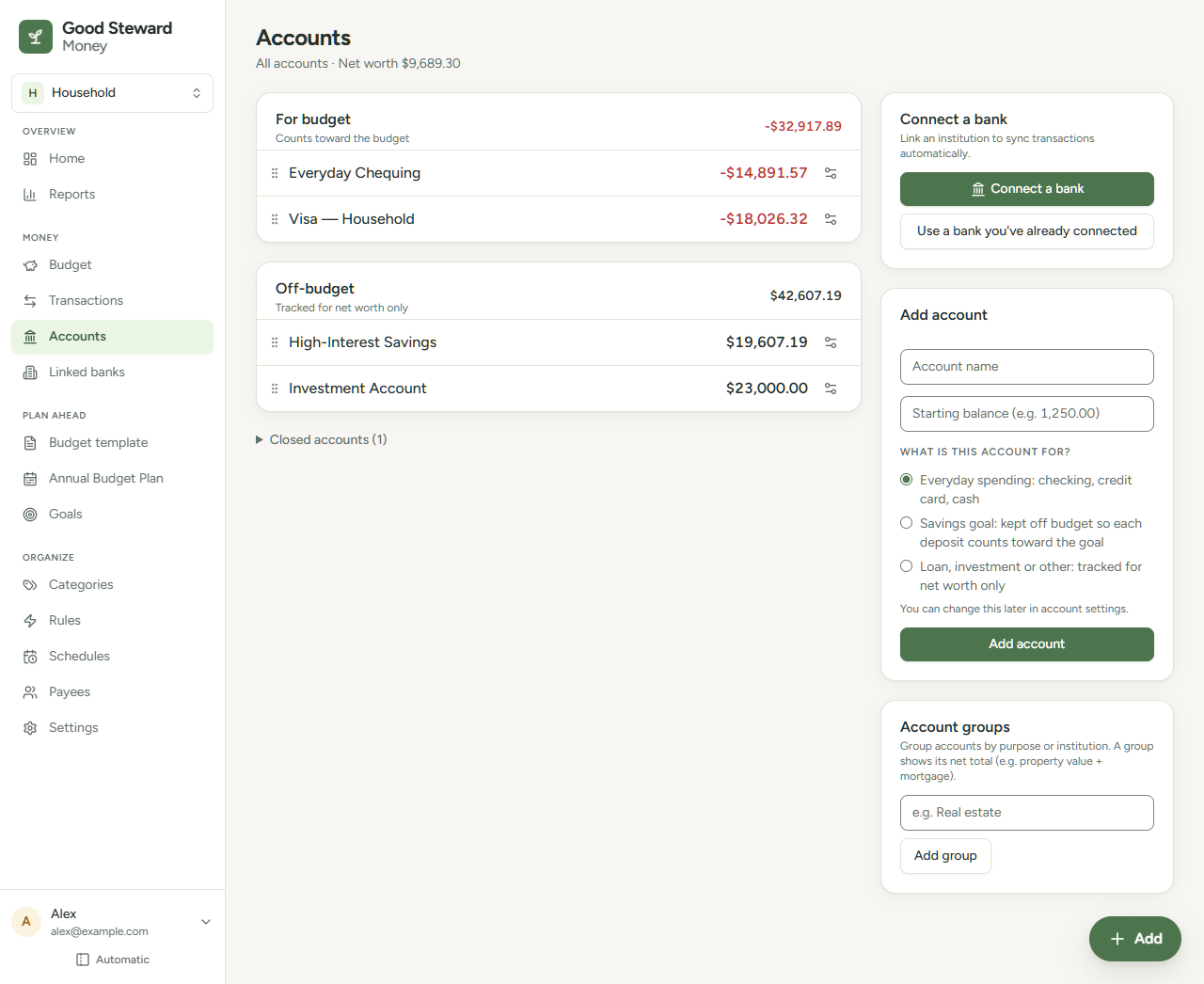
What each kind affects
| Place | On-budget account | Off-budget account |
|---|---|---|
| Budget page | Its categorized transactions count as income and spending | Not counted |
| Reports | Counted | Left out, except Net worth |
| Goals tracked by a category | Its categorized transactions count | Not counted |
| Net worth | Counted | Counted |
A closed account is left out of net worth. Its past transactions still count in the budget and reports. See Close, reopen or delete an account.
Example: you have Checking at $2,000.00 and a credit card at -$500.00, both on-budget, and Savings at $5,000.00, off-budget.
- The For budget section shows $1,500.00 ($2,000.00 - $500.00).
- The Off-budget section shows $5,000.00.
- Net worth is $6,500.00. The Accounts page shows it in the subtitle: "All accounts · Net worth $6,500.00".
An account set to Balance only is always off budget. It has no Move on budget button. See Transactions or Balance only for a bank account.
Transfers between the two kinds
A transfer between two on-budget accounts, or between two off-budget accounts, only moves money. It does not need a category.
A transfer between an on-budget account and an off-budget account moves money into or out of your budget. The on-budget side needs a category. A contribution from Checking to an off-budget savings account is an example. A goal tracked by that category counts the contribution. See Record a transfer between accounts and Goal progress calculations.
Move an account between the two
Select the Account settings icon (two sliders) at the right of the account's row on the Accounts page. In the Budget status card, select Move off budget or Move on budget.
- Nothing is deleted. Categories stay on the transactions and are ignored while the account is off-budget. Moving the account back restores their effect.
- When you move an account on budget, transactions without a category appear under the Uncategorized filter.
- If the move changes how categorized transfers count, a Move this account? dialog shows how many start or stop counting toward the budget. Select Move it or Keep as is. Without such transfers, the move happens at once.
- A goal tracked by a category follows the same rule. If you move an off-budget savings account on budget, the transfers into it stop counting toward the goal. Moving it back off budget counts them again.
The savings notice
An on-budget account can show a notice on the Accounts page that starts "Money coming into this account is categorized as savings." It suggests moving the account off budget so each contribution counts toward its purpose.
The notice appears when more money arrives in the account than leaves it in categories of a Savings & Investments group. See Money buckets and starter categories. A checking account that only sends money to savings does not show it.
- Select Move off budget to move the account.
- Select Dismiss to hide the notice for that account.