See where your income comes from
Total your income for a period, compare it with the period before and see which sources are Steady or Irregular.
Updated November 10, 2026
The Income report totals the money that came in during a period, charts it by month against your planned income and ranks each source. Each source is marked Steady, Irregular or Not enough history.
Steps
- Select Reports in the sidebar (on a phone, the Reports tab), then the Income card. The report opens on Last 12 months.
- Select a period chip or Pick months. To count some accounts only, use the accounts chip. This report has no compare setting. See Report controls.
- Select By payee (the default) or By category above the list.
Select a source to open its detail. On a wide screen it opens beside the list. On a smaller screen or a phone it opens under the row. Select the source again to close it.
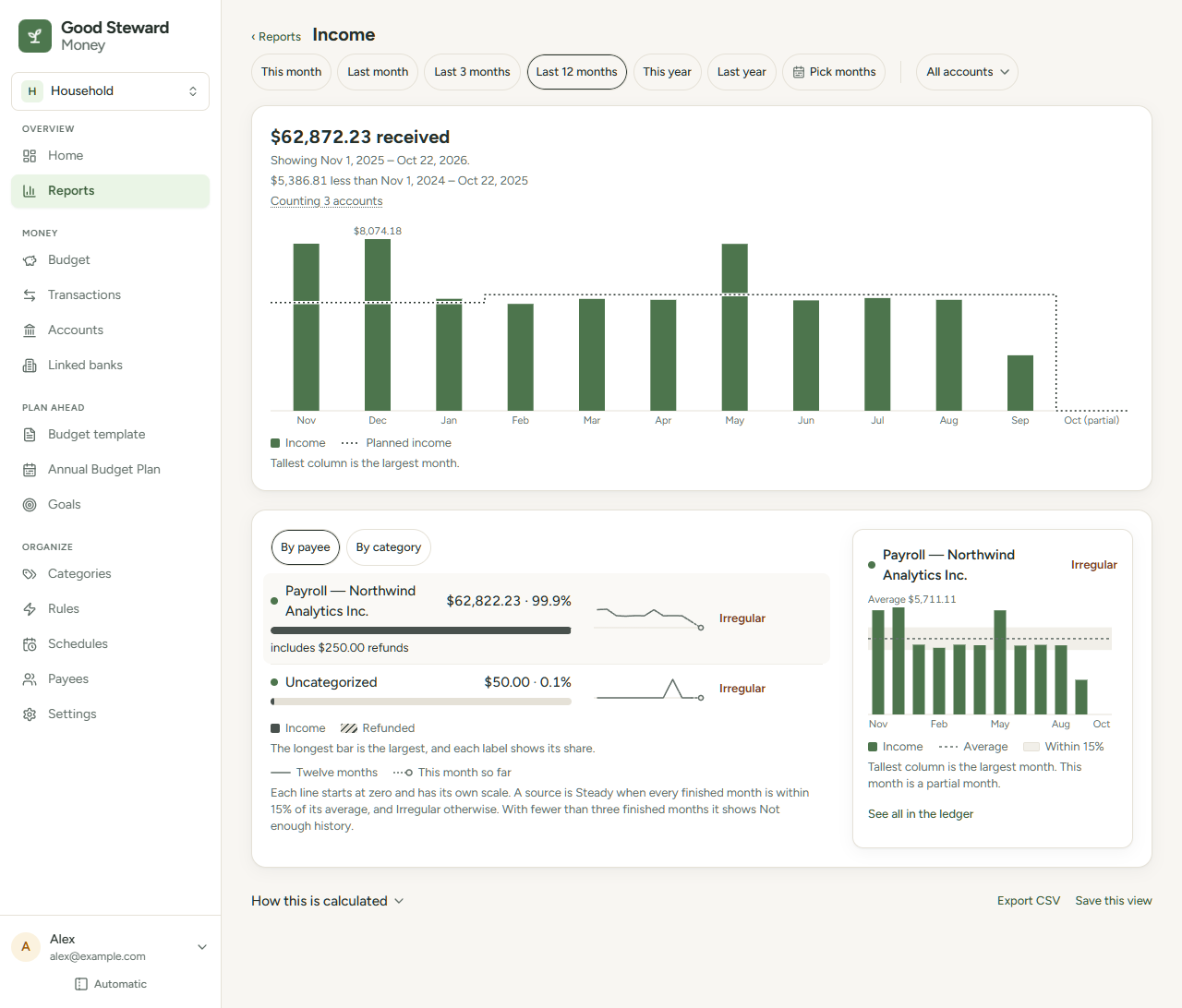
What the page shows
- Headline: the total, such as "$69,000.00 received", with the dates under it.
- Change line: the total against the period of the same length before it, such as "$4,100.00 less than Nov 1, 2024 – Oct 7, 2025". A period that ends this month is compared up to the same day of the month. A difference under $1.00 reads "about the same as". An earlier period with no income reads "Not enough history to compare to" and its dates.
- Monthly columns: one column per month, with a line for the planned income from your income categories on the Budget page. A month only partly in the period, such as this month, is hatched. A legend under the columns names the marks: Income, Planned income and Partial month for the hatch. An item shows only when the chart draws it. The planned income line is left out when you choose accounts or nothing is planned. When you choose accounts, a sentence under the legend reads "The planned income line shows only when all accounts are selected." Another sentence names a hatched month that has no "(partial)" label, such as "This month is a partial month." A period of fewer than three months draws no columns.
- Sources: each row shows the amount, its share of the sources listed, a bar, its mark and a twelve-month line. A legend under the list names the bar Income and, when a row has refunds, the hatched end Refunded. A second legend names the twelve-month line Twelve months, and This month so far for a line that ends in the unfinished month.
- Detail: the source's twelve monthly columns, a dashed average line, a shaded band within 15% of that average and See all in the ledger. Not enough history has no line or band. Its legend names the marks: Income, Average, Within 15% and Partial month.
Steady, Irregular and Not enough history
The mark is based on the twelve months that end where your period ends. It skips an unfinished last month and months before your first transaction. A month with nothing from the source counts as $0.00.
| Mark | When it shows |
|---|---|
| Steady | Every month is within 15% of the average of those months |
| Irregular | At least one month is more than 15% from the average |
| Not enough history | Fewer than three months to judge, or an average that is not above $0.00 |
What counts as income
Income is money in that is categorized in a group in the Income money bucket, plus money in with no category. Money in with no category has its own row, Uncategorized, in both views. In By category, a hidden category that has income in the period is listed with a small hidden label after its name. Money in under another bucket, such as a refund, lowers that category in Spending instead.
See all in the ledger lists every transaction for that payee or category in the period, not only money in. For Uncategorized, the ledger lists a split transaction in full, with all its lines, when one of its lines has no category.