Sketch a scenario from your income
Create a new budget template from one income figure and a percentage for each group, without touching your plan.
Updated October 30, 2026
Sketch a scenario builds a new budget template from your monthly take-home income and a percentage for each group. Use it to see how a different split would look.
Before you start
Your budget needs at least one group that is not an income group and has a category. Hidden groups and categories are left out. Without one, Sketch a scenario returns you to the Budget template page with no message.
Steps
- Select Budget template under Plan ahead in the sidebar (on a phone, the More tab, then Budget template), then select Sketch a scenario.
- Enter a name in Name this scenario. The default is "Sketch".
- Enter your income in Monthly take-home income.
- Under Start from a style, choose Balanced (selected at first), 50/30/20, Debt crush, Generosity forward or Saving season.
Under How should it flow?, change the percentage beside any group. Enter a whole percentage from 0 to 100. Changing one clears the style choice.
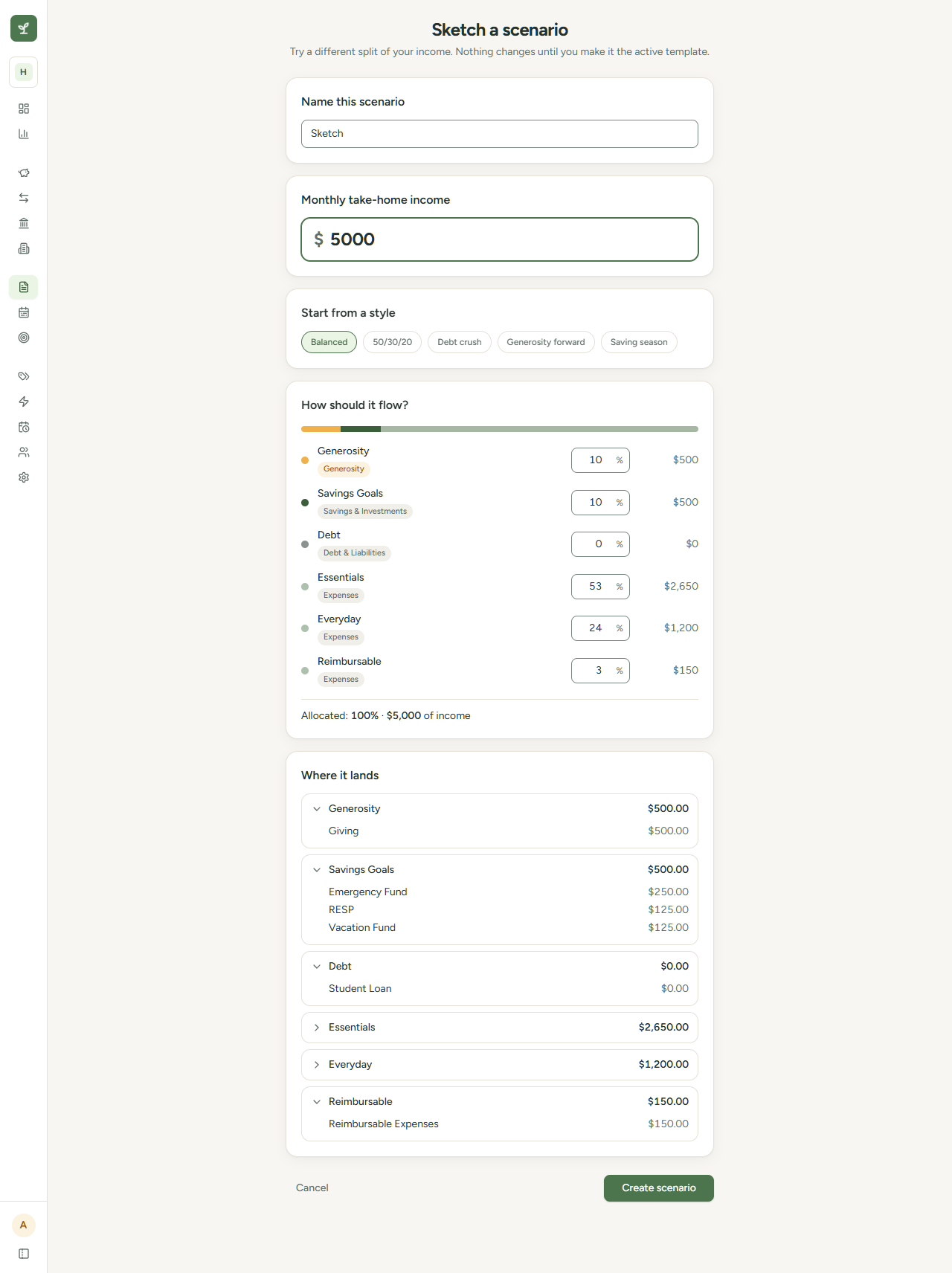
- Check Where it lands. Until you enter an income, the page says "Enter your income above to see monthly amounts." After that, it shows each group's dollar amount. Select a group to show or hide its categories.
- Select Create scenario. The button is dimmed until the income is above $0.
The new scenario opens on its worksheet.
How the split works
Each style sets a share for giving, saving, debt and everything else:
| Style | Generosity | Savings & Investments | Debt & Liabilities | Expenses |
|---|---|---|---|---|
| Balanced | 10% | 10% | 0% | 80% |
| 50/30/20 | 10% | 10% | 0% | 80% |
| Debt crush | 5% | 5% | 15% | 75% |
| Generosity forward | 15% | 10% | 0% | 75% |
| Saving season | 10% | 20% | 0% | 70% |
Balanced and 50/30/20 give the same split.
- If your budget has no group of a money type, that type's share is divided among the other types in proportion to their shares.
- Giving, saving and debt groups of the same type share that type's percentage equally.
- Expense groups share the Expenses percentage in proportion to the weight of their categories. Inside a group, categories do not get equal amounts. Names such as housing or groceries get larger shares than subscriptions or personal care.
For example, with $5,000 income and Balanced, Generosity gets $500, Savings & Investments gets $500 and the Expenses groups share $4,000.
The page shows "Allocated" as a percentage and a dollar amount. Under 100%, it says the rest stays unplanned. Over 100%, it says "Over 100%. Lower one or more groups." You can still create the scenario.
What it creates
- One monthly Spread line for each category that gets more than $0. Income groups get no line, so the scenario plans no income. To include income in the projection, enter it on the worksheet.
- A new scenario. It becomes active only if your budget had no active scenario. Otherwise, select Make active on the worksheet.
- No change to your plan until you apply a scenario. See Apply a template to your year.