Print a year-end giving statement
Print or save a record of every gift from one calendar year, grouped by recipient.
Updated November 10, 2026
Print or save a record of every gift you made in one calendar year, grouped by recipient. It is your own record, not an official tax receipt.
Steps
- Select Reports in the sidebar (on a phone, the Reports tab), then the Giving card.
- To cover only some accounts, select the accounts chip, choose the accounts and select Apply.
Select the Year-end statement card below the list. It opens the record for the current year.
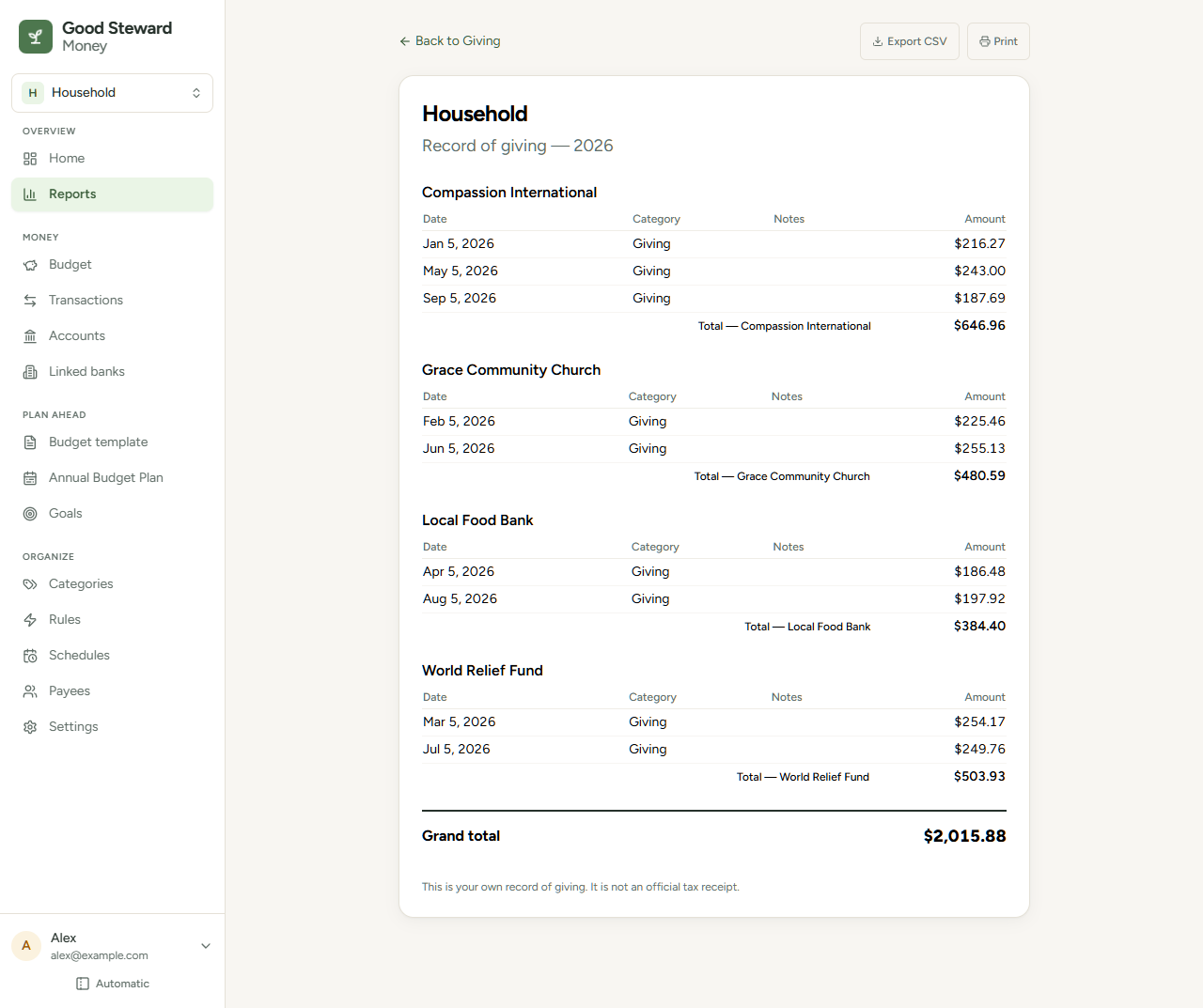
- Select Print. Your browser's print window opens.
- Choose a printer, or your browser's option to save as PDF, and confirm.
Only the record prints. The sidebar, menus and buttons are left out. Amounts are not blurred in the printout, even when Privacy mode is on.
What the statement lists
- Your budget file's name, and "Record of giving" with the year.
- With accounts chosen, a line such as "Covers Checking and Card." It names on-budget accounts only.
- One block for each recipient, in alphabetical order. A block lists every gift with its Date, Category, Notes and Amount, then a total for that recipient. A category you have hidden prints with its plain name: the statement never shows a hidden label, on the page or in the file.
- A Grand total for the year.
- The closing line "This is your own record of giving. It is not an official tax receipt."
The statement covers January 1 through December 31 and counts the same gifts as the Giving report. A year with no gifts shows "No gifts recorded for" and the year.
Print another year
The card always opens the current year, and the statement page has no year control. To open another year, change the number after y= in your browser's address bar, for example y=2025, and press Enter.
Export or go back
Export CSV downloads the same rows as a spreadsheet file named like good-steward-giving-statement-2026.csv, with a total row for each recipient and a Grand total row. With accounts chosen, the last row holds the "Covers" line.
Back to Giving returns to the report.